F5 Programmability Training > Class 3: Introduction to SecDevOps > Lab Information Source | Edit on
PreLab Configuration Steps:
Throughout this and other classes in the series we will make use of the Postman REST API Client. You can find more information about Postman at https://getpostman.com
Task 1 - Import the Postman Collection & Environment
In this task you will Import a Postman Collection & Environment for this lab. Perform the following steps to complete this task:
Open the Postman tool by clicking the
 icon of the desktop of
your Jumphost. The initial window may take a few moments to appear.
icon of the desktop of
your Jumphost. The initial window may take a few moments to appear.Note
The Postman client receives very frequent updates. If you are prompted to update the client please click the Remind me later button to skip updating the version installed in your lab environment
By default, the Postman client requires verification of SSL/TLS Certificates to a public Root Certificate Authority. However, by default, BIG-IP and many other devices use a self-signed certificate for SSL/TLS connections. To allow connections with self-signed certificates we need to modify the default settings of Postman.
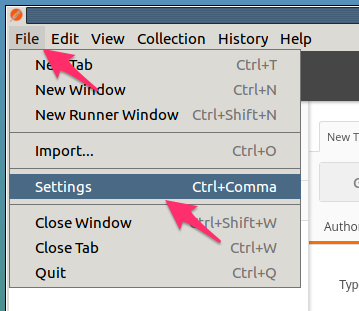
Open the Postman Settings windows by clicking :
Verify your client is configured to allow self-signed certificates by setting
SSL certificate verificationtoOFF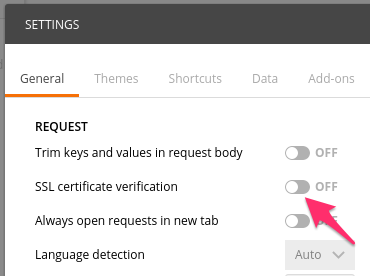
Click the X in the top right of the Settings window
A Postman Collection lets you group individual REST requests together. This Postman collection can then be shared and imported. To import a Postman Collection, click the Import button in the top left of the Postman window
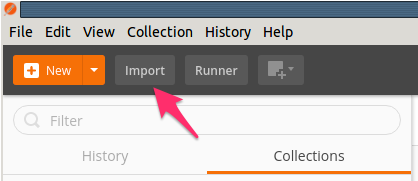
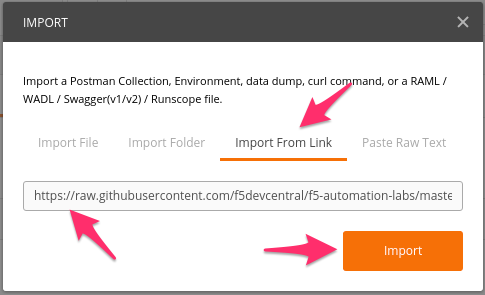
Click the Import from Link tab. Paste the following URL into the text box and click Import
https://raw.githubusercontent.com/f5devcentral/f5-automation-labs/master/postman_collections/F5_SecDevOps.postman_collection.json
You should now see a collection named F5 SecDevOps in your Postman Collections sidebar. Postman automatically resizes its GUI depending on its window size. It might be necessary to use the short
Ctrl + \(on Windows) or click the show sidebar icon at the bottom left corner of postman if you do not see the sidebar.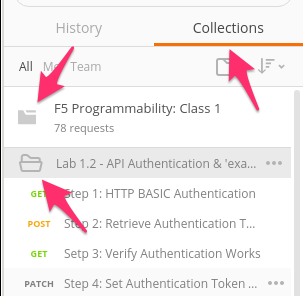
To assist in multi-step procedures we make heavy use of the Environments capability in Postman. This capability allows us to set various global variables that are then substituted into a request before it’s sent. Import the Environment file by clicking and pasting the following URL and clicking Import:
https://raw.githubusercontent.com/f5devcentral/f5-automation-labs/master/postman_collections/F5_SecDevOps.postman_environment.json
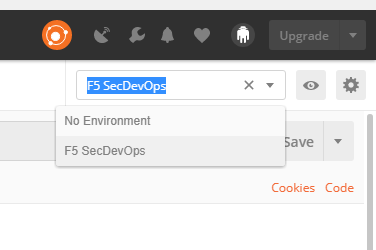
Set your environment to F5 SecDevOps by using the menu at the top right of your Postman window: