F5 Programmability Training > Class 2: Building Continuous Delivery Pipelines > Module 2: F5 f5-postman-workflows & f5-newman-wrapper Source | Edit on
Lab 2.2: Manually Execute a Workflow
In this lab we will walk through how to obtain two collections, and then we’ll use the f5-postman-workflows framework to execute a simple workflow using the Postman GUI client. The f5-postman-workflows GitHub repository is continually updated with new collections that can be used as is, or customized, to automate the F5 platform. Additionally, the f5-super-netops-container automatically downloads these and other tools so users can rapidly execute workflows in their environments.
Postman collections also serve as a reference example of how various tasks can be accomplished using an Imperative process. When executing a collection you are actually providing a Declarative input to an Imperative process.
Collections are self-documenting, and we will explore how to access the included documentation to assemble a workflow from beginning to end. In the next lab we will use this base knowledge to create workflows as JSON templates that can be executed by the f5-newman-wrapper on the f5-super-netops-container image (or any system that has Newman installed)
Task 1 - Import and Explore BIG-IP Collections
First, we will import two collections to Postman using the same steps in the previous labs. The two different collections will allow us to perform REST API Authentication to BIG-IP devices and then execute Operational actions on the BIG-IP device. We are stitching together two Imperative process’s.
Execute the following steps to complete this task:
Click Import -> Import from Link and import both of these collection URLs:
https://raw.githubusercontent.com/0xHiteshPatel/f5-postman-workflows/master/collections/BIG_IP/BIGIP_API_Authentication.postman_collection.jsonhttps://raw.githubusercontent.com/0xHiteshPatel/f5-postman-workflows/master/collections/BIG_IP/BIGIP_Operational_Workflows.postman_collection.json
You should now have two additional Collections in the sidebar:
- BIGIP_API_Authentication
- BIGIP_Operational_Workflows
Expand the
BIGIP_API_Authenticationcollection. Within the collection you will see one folder named1_Authenticate. Folders are used to organize various workflows within a collection. In this case this collection performs exactly one task, authentication, therefore one folder is present.Expand the
1_Authenticatefolder. Notice there are three requests in the folder. These three requests will be executed in a synchronous manner (one-after-another).Click the
...icon on the1_Authenticatefolder, then clickEdit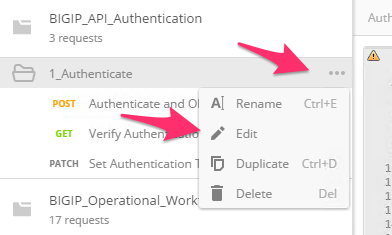
In the opened window you will see documentation explaining what the requests in this folder accomplish. Additionally you will see a series of Input and Output variables. Unless marked otherwise it is assumed that all Input variables are required. In this case the
bigip_token_timeoutvariable is optional.Folders may also contain output variables that are set to pass data between requests in different collections (A Waterfall). In this case the output variable is named
bigip_tokenand contains the authentication token that can be sent in theX-F5-Auth-TokenHTTP header to perform authentication.Close the window by clicking ‘Cancel’
Repeat the steps above and explore the
BIGIP_Operational_Workflowscollection, specifically the4A_Get_BIGIP_Versionfolder
Task 2 - Manually Chain Folders into a Workflow
In this task we will explore how to chain two folders together and manually execute a workflow. This example is simple, but should help illustrate how we can use folders as building blocks that can be assembled or chained together to construct a workflow.
We will use the 1_Authenticate folder in the BIGIP_API_Authentication
collection and then pass the authentication token to the
4A_Get_BIGIP_Version folder in the BIGIP_Operational_Workflows
collection.
Execute the following steps to complete this task:
Create a new Postman environment by clicking the Gear icon -> Manage Environments -> Add.
Name the environment
Lab 2.2and populate the following key/value pairs:- bigip_mgmt: 10.1.1.10
- bigip_username: admin
- bigip_password: admin
Click the ‘Add’ button, then close the ‘Manage Environments’ window.
Select the
Lab 2.2environment: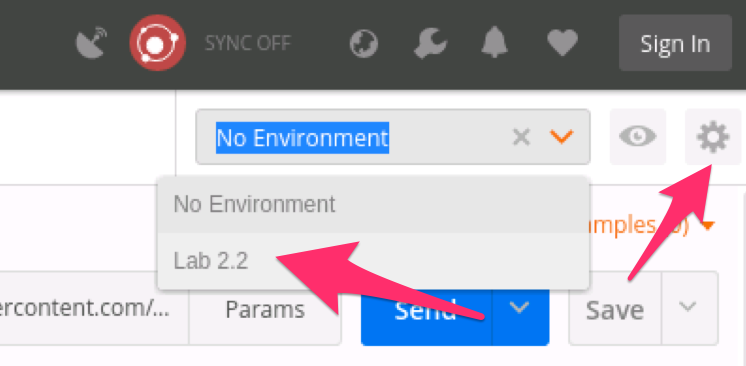
The preceding steps configured the Input Variables required for all the folders that comprise our workflow. We will now manually execute all the requests in the folders.
Expand the
BIGIP_API_Authentication->1_Authenticatefolder.Select the
Authenticate and Obtain Tokenitem and clickSendExamine the
Testsin the response portion of the request. All the tests should be passing. Additionally you should see a test similar to:[Populate Variable] bigip_token=....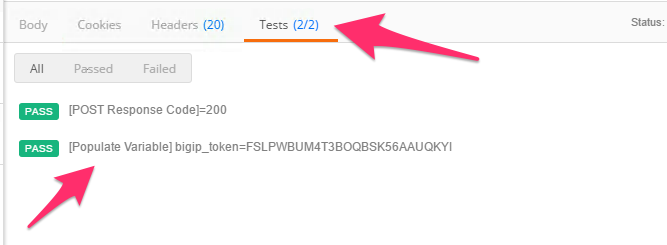
These test items and their corresponding actions (populating a variable in this case) are generated by the f5-postman-workflows framework.
Examine your Postman Environment variables and confirm that the
bigip_tokenvariable is present and populated.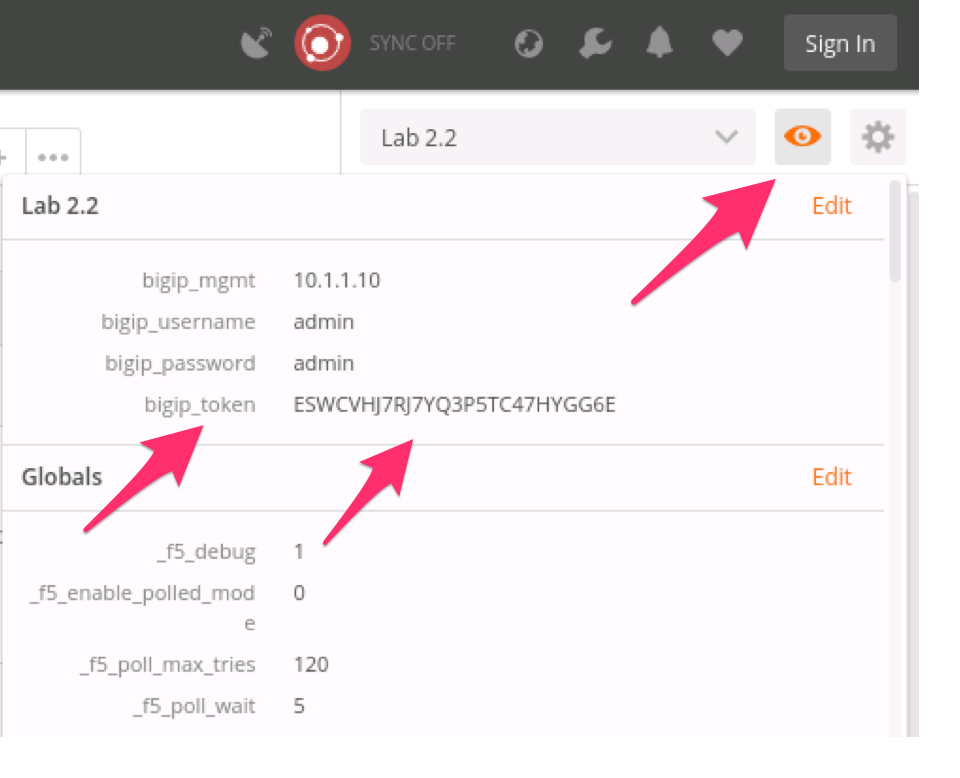
Select the
Verify Authentication Worksrequest in the folder and click ‘Send’. Examine the Tests and ensure they are all passingSelect the
Set Authentication Token Timeoutrequest, click Send and verify all Tests pass.
At this point we have successfully authenticated to our device and stored the
authentication token in the bigip_token environment variable. We will now
execute a request in a different collection and folder that uses the
bigip_token variable value to authenticate and perform its actions.
Expand the
BIGIP_Operational_Workflows->4A_Get_BIGIP_Versionfolder.Click the
Get Software Versionrequest.Click the ‘Headers’ tab. Notice that the value for the
X-F5-Auth-Tokenheader is populated with thebigip_tokenvariable value.Note
Postman uses the
{{variable_name}}syntax to perform variable value substitution.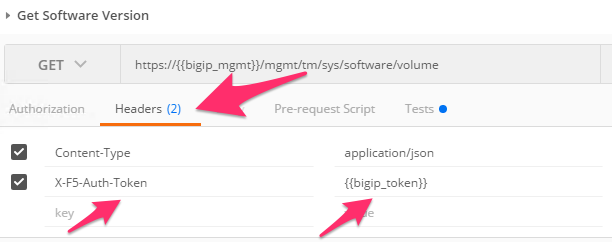
Click ‘Send’ to send the request. Examine the Tests and ensure all tests have passed.
Examine your environment variables and note that the
bigip_versionandbigip_buildvariables are now populated.
While the example above was simple, it should show how we can chain together different collections and folders to assemble custom workflows. The key concepts to understand are:
- The f5-postman-workflows framework and collection test-code performs unit tests on the response data, and verifies the request executed successfully.
- The framework also populates Output Variables as documented so they can be used in subsequent requests as Inputs to assemble a workflow
Next, we will explore how to use this base knowledge to assemble various collections and folders into workflows using Newman and the f5-newman-wrapper.