F5 Programmability Training > Class 2: Building Continuous Delivery Pipelines > Module 3: Stitching Workflows from Class 1 into new Orchestratable Collections Source | Edit on
Lab 3.2 - Execute f5-newman-wrapper for a Build Workflow
During the build of the Super-NetOps Container 5 f5-newman-wrapper files were,
git clone’d into your lab, these files will execute against the collections
noted in the previous lab. This lab will cover the Build aspect, creating a
Virtual Server Framework (Service) containing all the pieces required for this
testing, and deployment.
Note
This is a Postman Collection, and can also be imported into the Postman GUI client for viewing
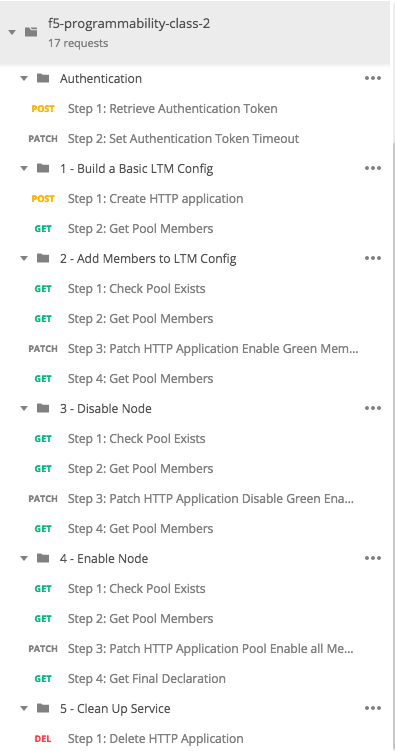
For a visual reference of what f5-programmability-class-2.postman_collection.json looks like:
Note
You do not need to have all these operations individually broken out, it is shown this way to educate that Workflows can be as small (update a pool member) or as large (deploy a whole service) as needed
Task 1 - Examine f5-newman-build-1
Note
The contents of this folder contain files for this lab, and upcoming labs in this class
Navigate to the location containing the f5-newman-wrapper files
/home/snops/f5-automation-labs/jenkins/f5-newman-buildLet’s examine the contents of the first f5-newman-wrapper file
cat f5-newman-build-11 2 3 4 5 6 7 8 9 10 11 12 13 14 15 16 17 18 19 20 21 22 23 24 25 26 27 28 29
{ "name": "f5-newman-build-1", "description": "Execute a chained workflow that authenticates to a BIG-IP and builds configuration", "globalEnvVars": "/home/snops/f5-postman-workflows/framework/f5-postman-workflows.postman_globals.json", "globalOptions": { "insecure": true, "reporters": ["cli"] }, "globalVars": { "bigip_mgmt": "10.1.1.10", "bigip_username": "admin", "bigip_password": "admin", "bigip_partition": "module_3", "bigip_pool_name": "module_3_pool", "bigip_pool_member": "10.1.10.101", "bigip_vs_name": "module_3_vs", "bigip_vs_destination": "10.1.20.129", "bigip_node_name": "10.1.10.101" }, "workflow": [ { "name": "Authenticate to BIG-IP", "options": { "collection": "/home/snops/f5-postman-workflows/collections/BIG_IP/BIGIP_API_Authentication.postman_collection.json", "folder": "1_Authenticate" } }, (REMOVE THIS TEXT AND ADD YOUR CODE BELOW) ] }
The above f5-newman-wrapper file only has the
Authenticate to BIG-IPCollection/Folder referenced, we will need to add in another collection. You are going to add this code snippet after the last},. This shows the method for chaining together multiple calls from multiple sources, shown in a previous lab. For editing files VIM/VI is installed on the container, if you do not know how to use VIM/VI please let the instructor know, edit the file withvi f5-newman-build-11 2 3 4 5 6 7 8
{ "name":"1 - Build a Basic LTM Config", "skip":false, "options": { "collection":"/home/snops/f5-automation-labs/postman_collections/f5-programmability-class-2.postman_collection.json", "folder":"1 - Build a Basic LTM Config" } }
Now that you have the full file you can see what it will look like with
cat f5-newman-build-1. The environment variables will float into both Collections, and the returned Global Variables will persist during the whole run.Example of a complete file:
1 2 3 4 5 6 7 8 9 10 11 12 13 14 15 16 17 18 19 20 21 22 23 24 25 26 27 28 29 30 31 32 33 34 35 36 37
{ "name":"f5-newman-build-1", "description":"Execute a chained workflow that authenticates to a BIG-IP and builds configuration", "globalEnvVars":"/home/snops/f5-postman-workflows/framework/f5-postman-workflows.postman_globals.json", "globalOptions": { "insecure":true, "reporters":["cli"] }, "globalVars": { "bigip_mgmt": "10.1.1.10", "bigip_username": "admin", "bigip_password": "admin", "bigip_partition": "module_3", "bigip_pool_name": "module_3_pool", "bigip_pool_member": "10.1.10.101", "bigip_vs_name": "module_3_vs", "bigip_vs_destination": "10.1.20.129", "bigip_node_name": "10.1.10.101" }, "workflow": [ { "name":"Authenticate to BIG-IP", "options": { "collection":"/home/snops/f5-postman-workflows/collections/BIG_IP/BIGIP_API_Authentication.postman_collection.json", "folder":"1_Authenticate" } }, { "name":"1 - Build a Basic LTM Config", "skip":false, "options": { "collection":"/home/snops/f5-automation-labs/postman_collections/f5-programmability-class-2.postman_collection.json", "folder":"1 - Build a Basic LTM Config" } } ] }
Task 2 - Execute the first f5-newman-wrapper file
Login to your BIG-IP A Lab Machine
Note
If you are using the F5 lab systems there are already shortcuts in your Chrome browser called
BIG-IP A GUI, if you receive a certificate warning accept and add exception (the BIG-IP has a self-signed cert which violates Chrome’s security). BIG-IP A Login credentials areadmin\adminf5-newman-build-1now contains the needed calls to build the Framework of an Application Service (Virtual Server, Pool and needed Profiles), The AS3 declaration includes disabled Pool members.Execute:
f5-newman-wrapper f5-newman-build-1Output should look like:
1 2 3 4 5 6 7 8 9 10 11 12 13 14 15 16 17 18 19 20 21 22 23 24 25 26 27 28 29 30 31 32 33 34 35 36 37 38 39 40 41 42 43 44 45 46 47 48 49 50 51 52 53 54 55 56 57 58 59 60 61 62 63 64 65 66 67 68 69 70 71 72 73 74 75 76 77 78 79 80
[root@f5-super-netops] [/home/snops/f5-automation-labs/jenkins/f5-newman-build] # f5-newman-wrapper f5-newman-build-1 [f5-newman-build-1-2018-07-30-07-33-17] starting run [f5-newman-build-1-2018-07-30-07-33-17] [runCollection][Authenticate to BIG-IP] running... newman BIGIP_API_Authentication ❏ 1_Authenticate ↳ Authenticate and Obtain Token POST https://10.1.1.10/mgmt/shared/authn/login [200 OK, 1.62KB, 499ms] ✓ [POST Response Code]=200 ✓ [Populate Variable] bigip_token=LENHO4RDRC23INWW64XDP6DSOE ↳ Verify Authentication Works GET https://10.1.1.10/mgmt/shared/authz/tokens/LENHO4RDRC23INWW64XDP6DSOE [200 OK, 1.44KB, 23ms] ✓ [GET Response Code]=200 ✓ [Current Value] token=LENHO4RDRC23INWW64XDP6DSOE ✓ [Check Value] token == LENHO4RDRC23INWW64XDP6DSOE ↳ Set Authentication Token Timeout PATCH https://10.1.1.10/mgmt/shared/authz/tokens/LENHO4RDRC23INWW64XDP6DSOE [200 OK, 1.44KB, 59ms] ✓ [PATCH Response Code]=200 ✓ [Current Value] timeout=1200 ✓ [Check Value] timeout == 1200 ┌─────────────────────────┬──────────┬──────────┐ │ │ executed │ failed │ ├─────────────────────────┼──────────┼──────────┤ │ iterations │ 1 │ 0 │ ├─────────────────────────┼──────────┼──────────┤ │ requests │ 3 │ 0 │ ├─────────────────────────┼──────────┼──────────┤ │ test-scripts │ 3 │ 0 │ ├─────────────────────────┼──────────┼──────────┤ │ prerequest-scripts │ 1 │ 0 │ ├─────────────────────────┼──────────┼──────────┤ │ assertions │ 8 │ 0 │ ├─────────────────────────┴──────────┴──────────┤ │ total run duration: 1113ms │ ├───────────────────────────────────────────────┤ │ total data received: 1.72KB (approx) │ ├───────────────────────────────────────────────┤ │ average response time: 193ms │ └───────────────────────────────────────────────┘ [f5-newman-build-1-2018-07-30-07-33-17] [runCollection][1 - Build a Basic LTM Config] running... newman f5-programmability-class-2 ❏ 1 - Build a Basic LTM Config ↳ Step 1: Create HTTP application POST https://10.1.1.10/mgmt/shared/appsvcs/declare [200 OK, 1.64KB, 9.8s] ✓ [POST Response Code]=200 ✓ [Current Value] results.0.message=no change ✓ [Check Value] results.0.message regex /success|no change/ ↳ Step 2: Get Pool Members GET https://10.1.1.10/mgmt/tm/ltm/pool/~module_3~module_3_vs~module_3_pool/members/ [200 OK, 1.1KB, 217ms] ✓ [GET Response Code]=200 ┌─────────────────────────┬──────────┬──────────┐ │ │ executed │ failed │ ├─────────────────────────┼──────────┼──────────┤ │ iterations │ 1 │ 0 │ ├─────────────────────────┼──────────┼──────────┤ │ requests │ 2 │ 0 │ ├─────────────────────────┼──────────┼──────────┤ │ test-scripts │ 4 │ 0 │ ├─────────────────────────┼──────────┼──────────┤ │ prerequest-scripts │ 2 │ 0 │ ├─────────────────────────┼──────────┼──────────┤ │ assertions │ 4 │ 0 │ ├─────────────────────────┴──────────┴──────────┤ │ total run duration: 10.5s │ ├───────────────────────────────────────────────┤ │ total data received: 889B (approx) │ ├───────────────────────────────────────────────┤ │ average response time: 5s │ └───────────────────────────────────────────────┘ [f5-newman-build-1-2018-07-30-07-33-17] run completed
Note
Notice the 200 OK responses, the number of requests etc., we’re building in testing and logging, look back at
BIGIP-Afor the newly created Application Service Framework, it will be under user partitionmodule_3On BIG-IP A, examine Virtual Server
module_3_vs:
On BIG-IP A, examine Pool
module_3_pool:
Task 3 - Execute the second f5-newman-wrapper file
f5-newman-build-2contains calls to add pool members to the Application Service Framework created above; this is done independently of the build, to show Service staging as a possible use case.Execute:
f5-newman-wrapper f5-newman-build-2Output should look like:
1 2 3 4 5 6 7 8 9 10 11 12 13 14 15 16 17 18 19 20 21 22 23 24 25 26 27 28 29 30 31 32 33 34 35 36 37 38 39 40 41 42 43 44 45 46 47 48 49 50 51 52 53 54 55 56 57 58 59 60 61 62 63 64 65 66 67 68 69 70 71 72 73 74 75 76 77 78 79 80 81 82 83 84 85 86 87 88
[root@f5-super-netops] [/home/snops/f5-automation-labs/jenkins/f5-newman-build] # f5-newman-wrapper f5-newman-build-2
[f5-newman-build-2-2018-07-30-07-46-56] starting run
[f5-newman-build-2-2018-07-30-07-46-56] [runCollection][Authenticate to BIG-IP] running...
newman

BIGIP_API_Authentication

❏ 1_Authenticate
↳ Authenticate and Obtain Token
  POST https://10.1.1.10/mgmt/shared/authn/login [200 OK, 1.62KB, 315ms]
  ✓  [POST Response Code]=200
  ✓  [Populate Variable] bigip_token=UJ6REIU5HLQBNQJRW2GAL73QF3

↳ Verify Authentication Works
  GET https://10.1.1.10/mgmt/shared/authz/tokens/UJ6REIU5HLQBNQJRW2GAL73QF3 [200 OK, 1.44KB, 24ms]
  ✓  [GET Response Code]=200
  ✓  [Current Value] token=UJ6REIU5HLQBNQJRW2GAL73QF3
  ✓  [Check Value] token == UJ6REIU5HLQBNQJRW2GAL73QF3

↳ Set Authentication Token Timeout
  PATCH https://10.1.1.10/mgmt/shared/authz/tokens/UJ6REIU5HLQBNQJRW2GAL73QF3 [200 OK, 1.44KB, 41ms]
  ✓  [PATCH Response Code]=200
  ✓  [Current Value] timeout=1200
  ✓  [Check Value] timeout == 1200

┌─────────────────────────┬──────────┬──────────┐
│                         │ executed │   failed │
├─────────────────────────┼──────────┼──────────┤
│              iterations │        1 │        0 │
├─────────────────────────┼──────────┼──────────┤
│                requests │        3 │        0 │
├─────────────────────────┼──────────┼──────────┤
│            test-scripts │        3 │        0 │
├─────────────────────────┼──────────┼──────────┤
│      prerequest-scripts │        1 │        0 │
├─────────────────────────┼──────────┼──────────┤
│              assertions │        8 │        0 │
├─────────────────────────┴──────────┴──────────┤
│ total run duration: 881ms                     │
├───────────────────────────────────────────────┤
│ total data received: 1.72KB (approx)          │
├───────────────────────────────────────────────┤
│ average response time: 126ms                  │
└───────────────────────────────────────────────┘
[f5-newman-build-2-2018-07-30-07-46-56] [runCollection][2 - Add Members to LTM Config] running...
newman

f5-programmability-class-2

❏ 2 - Add Members to LTM Config
↳ Step 1: Check Pool Exists
  GET https://10.1.1.10/mgmt/tm/ltm/pool/~module_3~module_3_vs~module_3_pool [200 OK, 1.87KB, 80ms]
  ✓  [GET Response Code]=200

↳ Step 2: Get Pool Members
  GET https://10.1.1.10/mgmt/tm/ltm/pool/~module_3~module_3_vs~module_3_pool/members/ [200 OK, 1.1KB, 78ms]
  ✓  [GET Response Code]=200

↳ Step 3: Patch HTTP Application Enable Green Members
  PATCH https://10.1.1.10/mgmt/shared/appsvcs/declare [200 OK, 1.65KB, 22.8s]
  ✓  [PATCH Response Code]=200
  ✓  [Current Value] results.0.message=success
  ✓  [Check Value] results.0.message regex /success|no change/

↳ Step 4: Get Pool Members
  GET https://10.1.1.10/mgmt/tm/ltm/pool/~module_3~module_3_vs~module_3_pool/members/ [200 OK, 2.27KB, 129ms]
  ✓  [GET Response Code]=200

┌─────────────────────────┬──────────┬──────────┐
│                         │ executed │   failed │
├─────────────────────────┼──────────┼──────────┤
│              iterations │        1 │        0 │
├─────────────────────────┼──────────┼──────────┤
│                requests │        4 │        0 │
├─────────────────────────┼──────────┼──────────┤
│            test-scripts │        8 │        0 │
├─────────────────────────┼──────────┼──────────┤
│      prerequest-scripts │        4 │        0 │
├─────────────────────────┼──────────┼──────────┤
│              assertions │        6 │        0 │
├─────────────────────────┴──────────┴──────────┤
│ total run duration: 23.9s                     │
├───────────────────────────────────────────────┤
│ total data received: 3.11KB (approx)          │
├───────────────────────────────────────────────┤
│ average response time: 5.8s                   │
└───────────────────────────────────────────────┘
[f5-newman-build-2-2018-07-30-07-46-56] run completed
On BIG-IP A examine Virtual Server
module_3_vs, the Virtual Server should be healthy and Green:
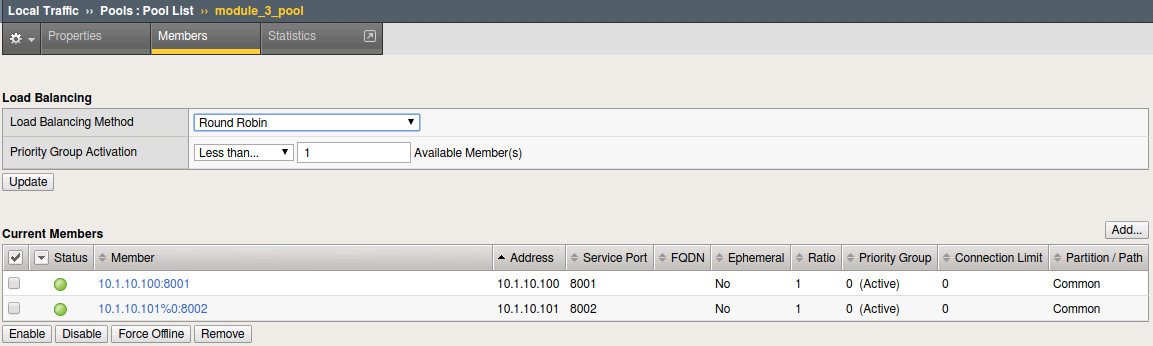
On BIG-IP A examine Pool
module_3_pool, these will represent ourGreendeployment members: